
There are many ways one may want to communicate from machine-to-machine. M2M communications has been done over radio networks for more than 50 years and with the millions of machines in use today, backward compatibility of a wireless platform is important .
Wireless Device (WD) to SERIAL
A DART can route data directly from a WD to a serial port on a computer or terminal server. Any telnet capable device can communicate with a WD running serial RS232/485/422.
This can be configured for point-to-point where one WD goes to one terminal server, or any number of WDs can have data routed to/from a terminal server.
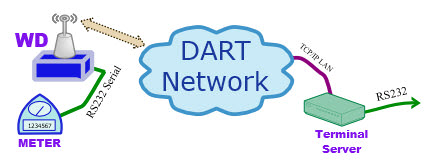
Raveon created a custom DART Network previously, and all of our data radios can be used for M2M. Machines connected to other Machines in long range areas is great.
WD to WD.
Raveon has OEM data modules for companies to use in their products. Using data radios in many sides will work with a CIGORN gateway communicating to your network and PCs.

All radio versions can also Sore and Forward Repeat data in long areas. A repeater can help setup M2M over 10-50 miles.
If your machines need sensor monitoring, Tech Series Raveon radios have GPIO interfaces.
A Remote Autonomous Zone Node version can monitor, report, and Autonomously manage IOs as you want.
WMX Protocol Feature
Build into every Raveon DATA radio modem is a free interface protocol a user may enable to allow the user’s application to specify destination IDs and to know the ID of the source of every message.
The WMX protocol was developed by Raveon in 2005 to aid data radio customers in message routing and addressing. It is an optional feature in Raveon data radio modems. When it is turned off, the radio modem sends and received the data in its messages with no framing. When it is enabled, all data in and out of a Wireless Device will be wrapped in a WMX packet. By enabling WMX, and user’s application or device can:
- Determine the source UNID of a data message.
- Specify the destination UNID a data message should be sent to
- Read the Received Signal Strength (RSSI) of a received message.
- Send commands to change parameters.