Solutions by Industry
- Smart Grid
- Mining and GeoExploration
- Oil and Gas Telemetry
- Wildfire Fighting
- AVL and Asset Tracking
- Remote Irrigation Solutions
- SCADA and Telemetry
- Custom Wireless Design
- Utilities Management
- Weather Monitoring
Raveon's Mission
Provide reliable wireless data products, offering exceptional performance and great value. By being a dedicated wireless partner, we ensure our products and services exceed the needs and expectations of our customers.
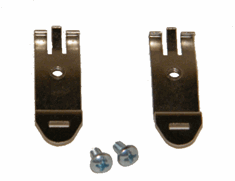 |
RV-M7-DINDIN rail mounting clips. Two clips included. These clips are secured tothe the bottom of the M7 series of radio modems. When secured to the the M7, the M7 will clip onto a standard DIN rail. |
||||||||
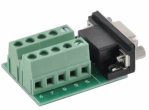 |
DB9M-TBThe field termination terminal block is very useful for interfacing the M7 radio modem with the RS-485 and RS-422 devices. Customer ordering the RS422/485 option should also order this field termination block because it makes installation very easy. |
||||||||
 |
PS-60AC-DC power supply for M7 series of data radios. Specifications:
|
||||||||
 |
RT-CB-H1DC power cord for M7 series data radio modems. Each M7 radio is shipped with one, RT-CB-H1. |
||||||||
 |
RT-M7-HSHeatsink Option for M7 series of data radios. With this option, the M7 will operate at up to 100% duty cycle with an ambient temperature of 45C. With air circulating on the heatsink fins, the M7 may be operated at 100% duty cycle up to 50C. |
||||||||
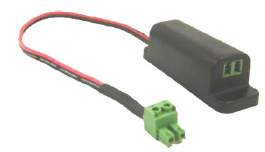 |
RV-SP-xIn-Line DC Surge Protector. The RV-SP-x is designed to be plugged in-line with the DC input to electrical devices that may be subject to over-voltage (> 16V) events, large transient voltage spikes, electrical noise, or RF noise. It filters the DC and protects the connected device from over-voltage and transient events. |
||||||||
 |
M7-USBUSB Option for M7 series of data radios. USB option replaces the standard DB9 RS232 serial connector with a USB 2.0 MINI-B connector and internal a USB-Serial bridge. All features and functions of the M7 remain available via the USB connection. |